
Download the executive summary
What Can Copilot’s Earliest Users Teach Us About Generative AI at Work?
EEight months ago, we introduced Microsoft 365 Copilot to reduce digital debt and increase productivity so people can focus on the work that is uniquely human. What everyone wants to know now is: will generative AI really transform work, and how?ight months ago, we introduced Microsoft 365 Copilot to reduce digital debt and increase productivity so people can focus on the work that is uniquely human. What everyone wants to know now is: will generative AI really transform work, and how?
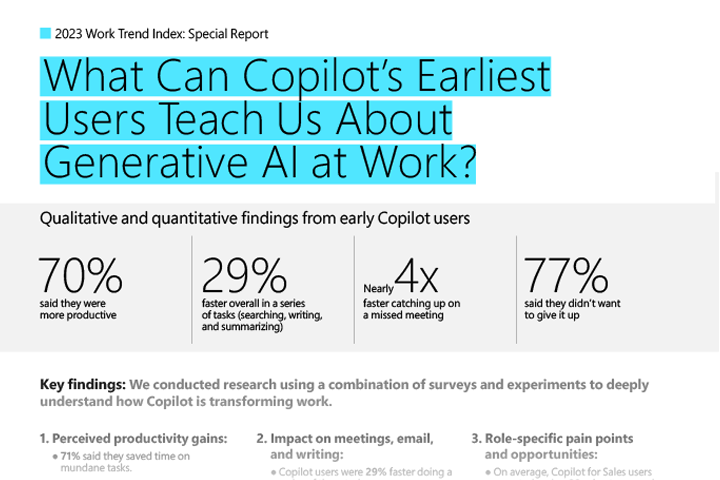
New data shows that the productivity gains are real. We conducted research using a combination of surveys and experiments to deeply understand how Copilot is transforming work—learning with and alongside our customers as we scale. Already, Copilot makes people more productive and creative, and saves time. Early users don’t want to go back to working without it: 77% said they don’t want to give it up.
And this is just the beginning. As use of generative AI at work spreads, the real opportunity is to not only transform personal productivity but lift the capability of the entire organization. Copilot sets a new baseline—one where every employee gains the skills to write, design, code, analyze data, and more. And it amplifies expertise, taking work from good to exceptional.
Read on to learn what the first in-depth studies of Copilot at work reveal.
First Look
Across our research, here’s what stood out:
70% of Copilot users said they were more productive, and 68% said it improved the quality of their work.
Overall, users were 29% faster in a series of tasks (searching, writing, and summarizing).
Users were able to get caught up on a missed meeting nearly 4x faster.
64% of users said Copilot helps them spend less time processing email.
85% of users said Copilot helps them get to a good first draft faster.
75% of users said Copilot “saves me time by finding whatever I need in my files.”
77% of users said once they used Copilot, they didn’t want to give it up.
Table of Contents
1.
Perceived productivity gains of Copilot
We surveyed 297 users in our Microsoft 365 Copilot Early Access Program to learn how they are using Copilot—from meetings to drafting documents. Overall, they reported productivity gains and time savings consistent with the gains developers experienced using GitHub Copilot.
Copilot users are more productive—and complete work faster:
70% of Copilot users said they were more productive.
73% said they could complete tasks faster.
64% said Copilot helps them spend less time processing email.
85% said Copilot helps them get to a good first draft faster.
87% said Copilot makes it easier to get started on a first draft.
86% said Copilot makes it easier to catch up on what they missed.
84% said Copilot makes it easier to take action after a meeting.
75% said Copilot saves time by finding whatever they need in their files.
71% said they saved time on mundane tasks.
Copilot improves quality and creativity:
68% said it improved the quality of their work.
57% said it made them more creative.
68% said Copilot helped them jump-start the creative process.
72% said it helped them generate ideas while writing.
“It helps [people] get to their ideas faster…It’s not there to replace them, it’s just something they can use to supercharge their ideas.”
Copilot is shifting how users spend their time:
67% said Copilot saved them time so they could focus on more important work.
On average, users reported daily time savings of 14 minutes, or 1.2 hours a week.
22% of people said they save more than 30 minutes a day.
If users reported saving more than 30 minutes a day, we asked them what they spent that saved time on.
The top answer was focus work (53%), and hardly anyone was spending it on administrative tasks such as data entry (7%).
However, the second most common answer was using that time for additional meetings (16%)—which could be counterproductive on top of already high meeting loads.
These time savings are extraordinary, but it will be key for everyone to reinvest their refunded time wisely.
Copilot makes people more productive and creative, and saves time
Here’s how it breaks down, according to early users
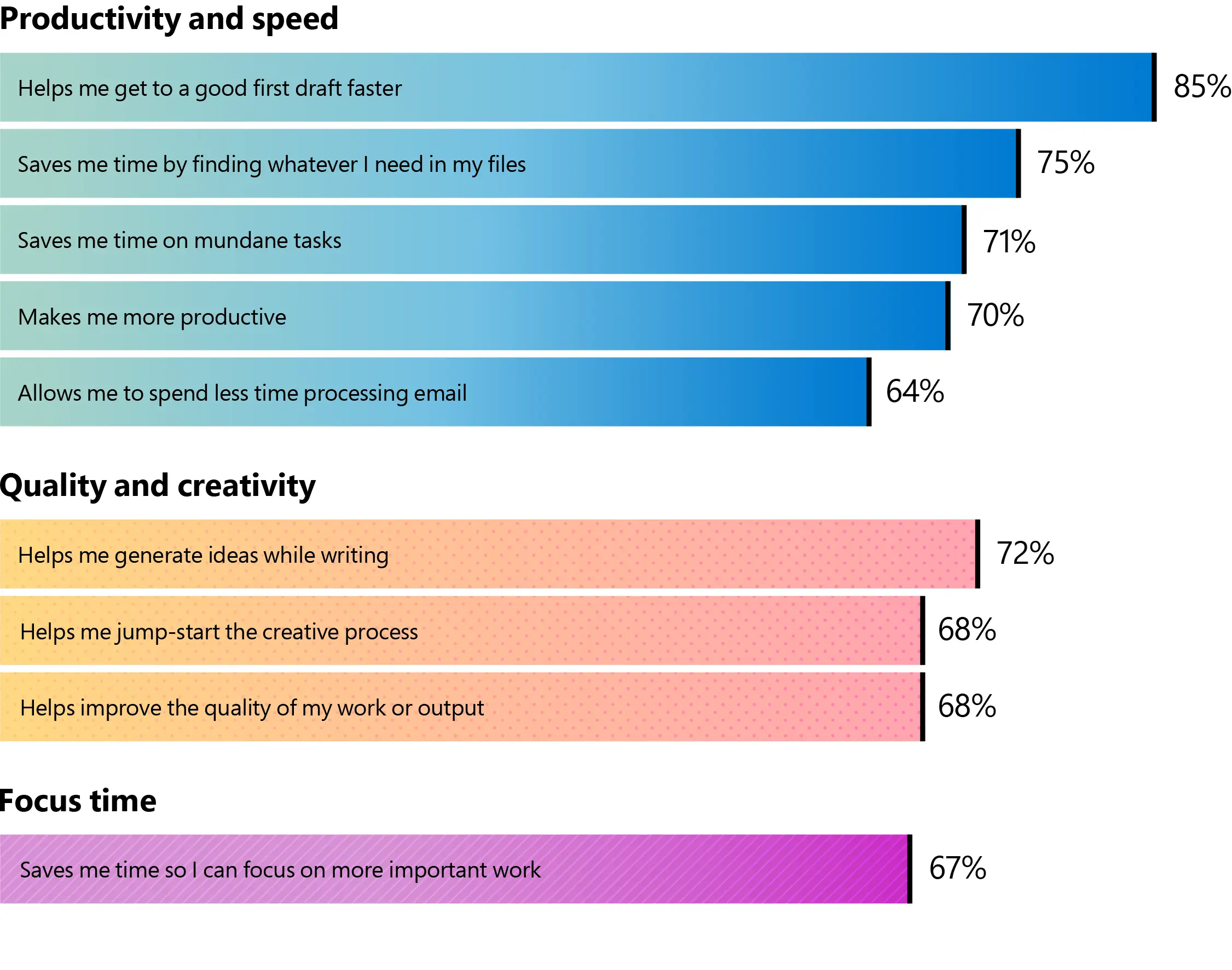
Survey questions: Please indicate your level of agreement with the following statements. Using Copilot...; To what extent do you agree with the following statements about your experience using Copilot in Word/Outlook/Microsoft 365 Chat specifically? Using Copilot …
We also wanted to understand how valuable Copilot is to employees. Early users told us once they’ve worked with Copilot, they don’t want to go back to working without it.
77% would not want to give it up.
Most people also said they would rather have access to Copilot than a free lunch at work—on a monthly (88%), bi-weekly (79%), or weekly (77%) basis.
30% even said access to Copilot would influence their choice of employer.
Is Copilot worth more than a free lunch?
If offered the choice, users overwhelmingly said they would pick Copilot
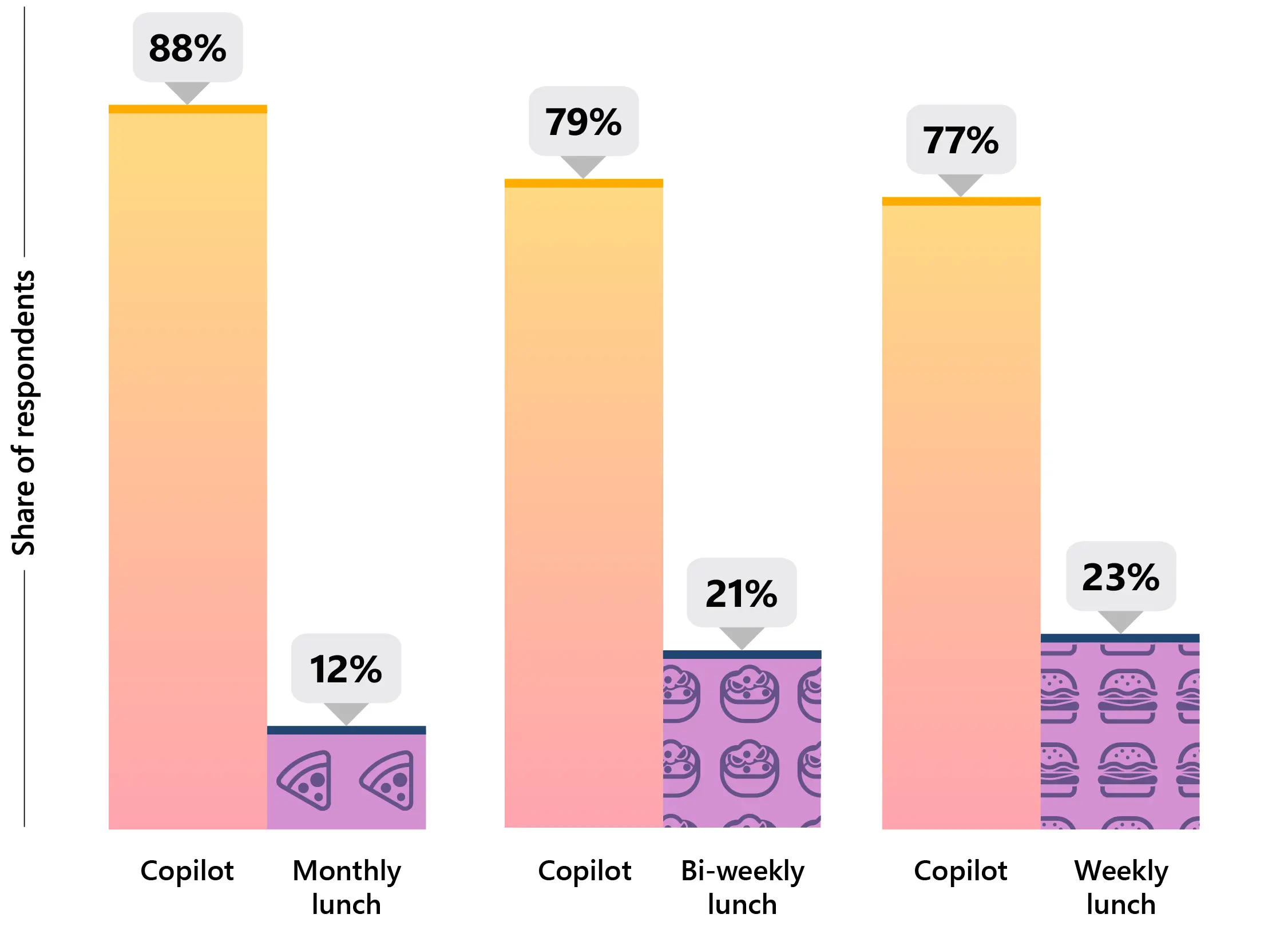
Survey question: If your organization offered you the choice between a monthly/bi-weekly/weekly free lunch and having access to Copilot, which would you choose? (Monthly free lunch estimated $10/month, bi-weekly free lunch estimated $20/month, weekly free lunch estimated $40/month)
2.
Copilot’s impact on meetings, email, information search, and writing
In addition to qualitative research, we set out to quantify the productivity gains of Copilot through observational studies across four building blocks of knowledge work: meetings, email, searching for information, and writing. We know the digital debt that people feel is real. Our heaviest Microsoft 365 users receive more than 250 emails a day as well as send and receive 150 chats1, and Teams meetings per person are up 3x globally since 20222.
With Copilot, people save time on key tasks
Quantitative findings show Copilot increasing speed on tasks like writing, summarizing a meeting, and searching for information
Study #1: A day in the life
The first study simulated a day in the life of a knowledge worker across a series of tasks. We divided 147 people into two groups, one working with Copilot and one without. We asked them to do three tasks: search for information across multiple sources, summarize a meeting recording, and write a blog post.
Copilot users completed tasks faster—while preserving quality and accuracy:
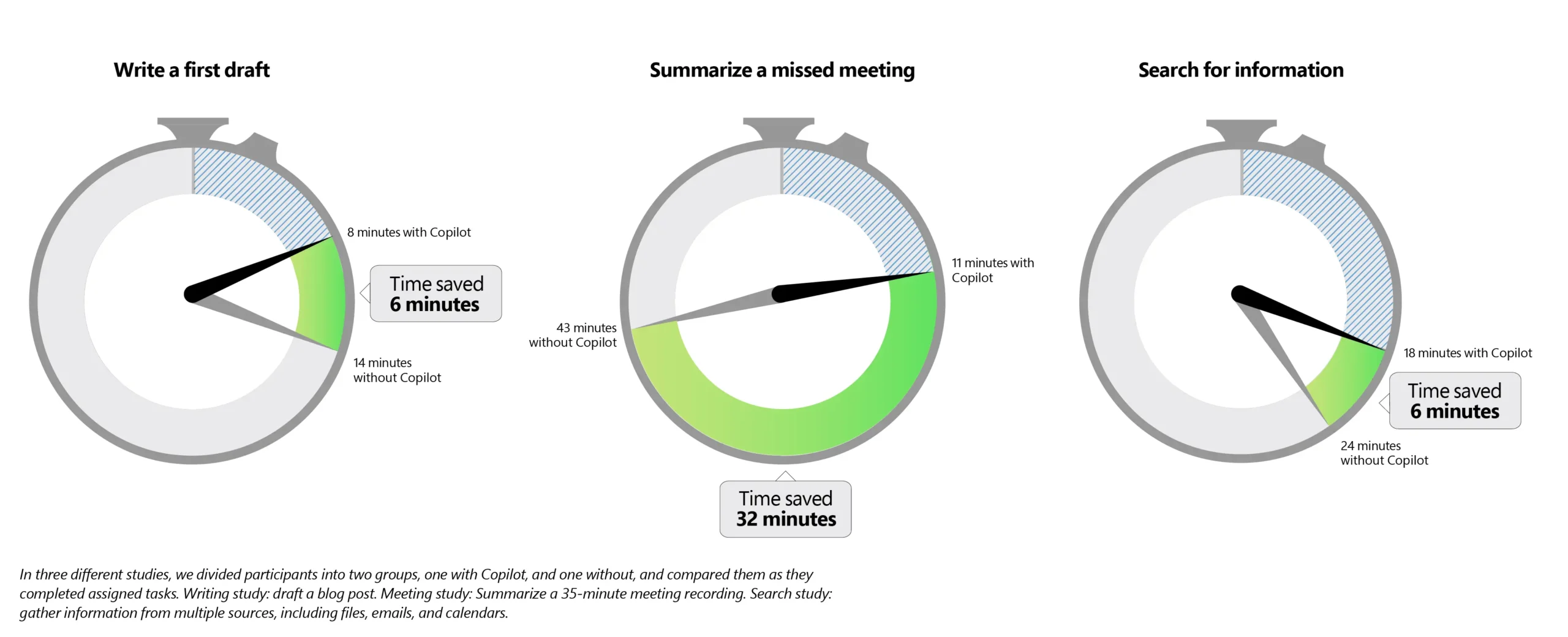
Users were 29% faster in all three tasks, taking 29 minutes and 42 seconds, compared to 42 minutes and 6 seconds.
For the writing task alone, a first draft with Copilot took 8 minutes and 12 seconds versus 13 minutes and 48 seconds.
Across all three tasks, there was no statistically significant difference in accuracy.
A Large Language Model (LLM) panel also scored the blogs written with and without Copilot. There was no statistically significant difference in quality.
Copilot actually lifts the weight of work:
Copilot users don’t just expend less effort—they feel like they do too.
85% of users said Copilot reduced effort to complete the tasks.
Study #2: The missed meeting
Here we looked specifically at Copilot in Teams, where we’ve seen the heaviest Copilot usage to date. We split 60 Microsoft employees into two groups, one with Copilot and one without, and asked them to summarize a meeting they missed. The 35-minute recorded meeting included crosstalk, debate, and off-topic discussions to make the task harder and give it the feel of a real meeting.
Copilot users summarized the meeting nearly 4x faster (3.8), in 11 minutes and 13 seconds, compared to 42 minutes and 34 seconds.
Copilot users felt 2x more productive.
Copilot users found the task to be 58% less draining.
As expected, we saw a slight decrease in comprehensiveness. Out of 15 meeting details for a perfect summarization score, Copilot users included 11, whereas control users included 12.
“Our people are seeing immediate productivity improvements with Copilot.”
Study #3: Email effectiveness
We also asked a 62-person blind panel to rate the clarity and conciseness of multiple email messages, some written with the help of Copilot, some without. Study participants did not know which messages were written with Copilot.
Emails written with Copilot were rated 18% more clear.
Emails written with Copilot were also rated 19% more concise.
Participants scored emails written with Copilot 25% higher on, “Couldn’t have said it better myself.”
“We are seeing meaningful impact in our daily lives; it makes a difference when we are able to find information faster or we are shown relevant content. We are more agile, Microsoft Copilot is helping us to have the right information at our fingertips.”
Study #4: The strain of searching
We asked 163 participants, 80 with Copilot and 83 without, to replicate the task of pulling together information from multiple sources—searching for information across files, emails, and calendars. We asked the subjects to imagine they were joining the procurement department of a fictional company. They were tasked with retrieving information about company procurement policy (requiring searching through company files), about what kind of help their fictional manager needed (requiring searching email), and about the timing of two upcoming meetings (requiring searching a calendar).
Copilot users were 27% faster, finishing in 17 minutes and 54 seconds, compared to 24 minutes and 18 seconds.
There was no statistically significant change in accuracy between the two groups.
3.
Role-specific pain points and opportunities
We see broader opportunity for Copilot to drive organizational impact at scale across every function. We’re taking a learn-it-all approach, starting with our own salespeople and customer service agents.
Sales
We surveyed 133 Microsoft salespeople who use Copilot for Sales at least weekly. Here’s what we found:
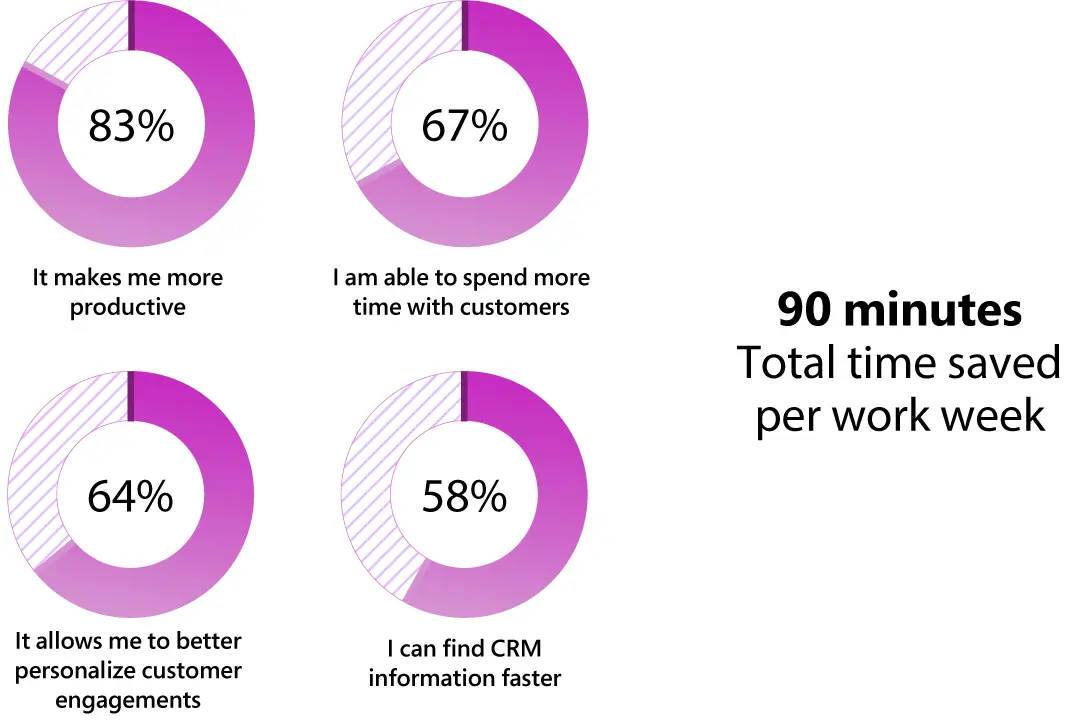
On average, users reported saving 90 minutes a week.
83% said Copilot for Sales makes them more productive.
79% said it reduces the amount of administrative work they have to do.
78% said it helps them stay in the flow of work.
73% said they can complete tasks more easily.
68% said they can keep their Customer Relationship Management (CRM) systems up to date with less effort.
67% said they are able to spend more time with their customers.
64% said it allows them to better personalize customer engagements.
58% said they find CRM information they need faster.
Copilot for Sales gives sellers a better way to work
In a survey, Microsoft’s own sales team reported on key benefits. Here’s what they said:
Survey questions: Thinking of your experience using Sales Copilot so far, please indicate your level of agreement or disagreement with the following statements. Think about how long it takes you to complete tasks with Sales Copilot (e.g., summarizing sales meetings, capturing the main points of an email or thread, etc.) and how long it takes you to complete the same tasks without Sales Copilot; How much time do you save per week by using Sales Copilot?
Customer Service
In another study, we evaluated how Copilot in Dynamics 365 Customer Service has impacted agent productivity between April 2023 and July 2023 in Microsoft’s own Customer Service and Support (CSS) team, one of the largest customer service organizations in the world. We studied two groups: 6,500 agents who used Copilot and a control group of 5,000 agents who did not use Copilot.
Agents with Copilot had a 12% reduction in time spent resolving a case.
10% of cases that normally require collaboration with peers were resolved independently when agents had access to Copilot—meaning fewer customers had to be put on hold.
Security
There’s also an urgent need for Copilot to help bridge the skills gap for the cybersecurity workforce, with 3 million unfilled positions worldwide as cyber threats increase in frequency and severity. In one study, we looked at how Copilot for Security can help defenders, regardless of their expertise level. We compared the performance of 149 new-in-career security analysts divided into two groups, one with Copilot and one without. Both groups were asked to identify scripts used by cyber attackers, create incident reports, and identify appropriate remediation steps.
Results showed:
Copilot users were 44% more accurate and 26% faster across all tasks.
86% said Copilot for Security helped them improve the quality of their work.
83% said Copilot reduced the effort needed to complete the task.
86% said Copilot made them more productive.
90% said they want Copilot next time they do the same task.
Transforming business process with AI
We surveyed 18,100 people in 12 countries across six key functions to better understand the broader opportunity for generative AI to fundamentally transform business process. Overall, people told us they are drowning in digital debt. They estimate spending more time searching for information (27% of their day) than creating (24%), communicating (24%), or consuming it (25%). And they say only half (50%) of the information they consume each day is necessary for their job.
We asked people where generative AI could have a positive impact on job performance across all six functions. Topping the list was “finding the information I need.” From there, we saw unique needs emerge by function.
Salespeople cited identifying sales opportunities (75%) and unifying marketing and sales data (74%).
Customer service agents cited intelligently routing issues to appropriate agents (70%) and detecting trends across agent-customer interactions (68%).
In finance, people cited simplifying financial reporting (73%) and validating data quality (72%).
Global Survey: How AI will impact specific roles
Here’s how sales, customer service, and finance professionals say AI would improve their performance the most
While these are early findings, over time we expect Copilot to result in more deals closed, more customer service cases resolved, and happier customers—the hard measures that not only make work more satisfying and fulfilling but that ultimately drive the bottom line.
The Path Forward
The data shows that the personal productivity gains from Copilot are real and significant. But moving beyond individual experimentation to build an AI-powered organization will require committing to work in a new way. Those who treat Copilot not as a search engine but as a highly capable, infinitely patient, always available assistant will gain the most.
Build a daily habit with Copilot. Like exercising or mastering a new language, realizing Copilot’s productivity gains will take intentional everyday practice. Those who start building the habit early will pull ahead.
Think like a manager. Tapping into Copilot’s full potential requires the ability to delegate, exercise good judgment, and apply subject-matter expertise—the essential human skills for a machine age. Every employee will need to manage their new assistant and know when to delegate a task to AI and when to apply their own unique human intelligence.
Don’t squander reclaimed time. One of the new leadership imperatives is to help every employee be intentional about the time they save with Copilot. Managers can spend more time coaching and caring for their teams. Salespeople can devote more of their workday to building relationships with customers and closing deals, and marketers can carve out time to dream up new products. Going forward, everyone will have more energy for the rewarding work that has the most impact and value for the organization.
1 Data represents top 20 percent of users by volume of searches across Microsoft 365 services, emails received, and sent and read chats in Teams, respectively
2 Microsoft Work Trend Index Annual Report 2023: Will AI Fix Work? (microsoft.com)
Methodology:
Survey of users in Microsoft 365 Copilot Early Access Program
Product Name Updates: Some product names have changed since the implementation of the surveys.
Microsoft 365 Copilot refers to the product now called Microsoft 365 Copilot
Microsoft 365 Chat refers to the product now called Copilot with Graph-grounded chat for Microsoft 365 (or Copilot)
Sales Copilot refers to the product now called Copilot for Sales
For consistency and clarity, the updated names will be used throughout this report.
The Microsoft 365 Copilot Usage in the Workplace Survey was conducted in partnership with MS Digital and People Science at Microsoft, among 297 users from customer organizations participating in the Early Access Program. The survey was 10 minutes in length and was deployed globally from October 3, 2023, to November 2, 2023, with a cross-functional representation in its sample. The survey was fully anonymous. In this report, we included only responses from our 297 customer respondents and excluded from final analysis anyone who had been using Microsoft 365 Copilot for less than three weeks.
For any questions about their experiences related specifically to any one Copilot app (e.g., Copilot in Teams or Copilot in Word), respondents were only branched to these questions if they reported using the apps on a daily or weekly basis. This pertains to the following data points:
Copilot in Outlook:
64% said Copilot reduces time spent processing email.
Copilot in Word:
85% said Copilot helps them get to a good first draft faster.
87% of users said Copilot makes it easier to get started on a first draft.
72% said it helped them generate ideas while writing.
Copilot in Teams:
86% said Copilot makes it easier to catch up on what they missed.
84% said Copilot makes it easier to take action after a meeting.
Microsoft 365 Chat:
75% said Copilot saves time by finding whatever they need in their files.
The metric of daily average time savings was produced by taking the average of responses to the following question: “On average, how much time does Copilot save you on a daily basis?” Users had the ability to choose from one of the following buckets: 0 minutes, <5 minutes, 5–10 minutes, 11–30 minutes, 31–60 minutes, and >1 hour. To compute the average across responses, the lower end of each bucket was used (e.g., 5 minutes for the “5–10 minutes” response) so that the 1.2 hours metric represents a baseline weekly time savings estimate.
Market representation includes:
Africa: South Africa
Asia: Afghanistan, China, Egypt, Georgia, India, Japan, Kazakhstan, Turkey, United Arab Emirates
Central America and the Caribbean: Belize
Europe: Albania, Austria, Belarus, Belgium, Czech Republic, Denmark, France, Germany, Greece, Hungary, Ireland, Italy, Luxembourg, Netherlands, Norway, Poland, Portugal, Romania, Spain, Sweden, Switzerland, Ukraine, United Kingdom, Northern Ireland
North America: Canada, United States of America
Australia and New Zealand: Australia
Latin America: Brazil, Colombia, Mexico
Industry representation includes:
Financial services, Professional services (i.e., accounting, consulting, legal firm), Healthcare, Consumer packaged goods, Banking, Technology (i.e., information technology), Entertainment, Education, Manufacturing, Food and beverage, Automotive, Government (state, local, or national), Energy, Construction, Telecommunications, Transportation, Retail (including both stores with physical locations and online-only retailers), Media/Press
‘A day in the life’ study
Microsoft’s Office of the Chief Economist ran this external lab experiment to test the productivity benefits of Microsoft 365 Copilot. We recruited subjects using the Upwork platform, providing some with standard Microsoft 365 and some with Microsoft 365 Copilot. We assigned users a suite of tasks including information retrieval, understanding a missed meeting, and drafting a blog post to announce a product. We scored their work according to the accuracy of the information found and the quality of the post drafted. We also timed their completion, then asked them how they felt about the task and the products they used.
‘The missed meeting’ study
Our internal Copilot lab experiment in Microsoft Teams was conducted in partnership with Aether and MS Digital using internal Microsoft employees from Sales, Finance, Real Estate, HR, and Engineering functions. For this research, we scripted and recorded a 35-minute Teams meeting between four employees about their team offsite. Participants with access to Copilot in Teams (based on pre-screener data) were invited to or forwarded this meeting to use Copilot with the recording, while those without Copilot were given a Stream link to the recording and transcript. We then asked participants to write a 200- to 300-word email summarizing the details of the “missed” meeting and, afterward, had them answer questions about their impressions of the task, and Copilot, if applicable. Participants completed the study unmoderated, online, while recording their computer screen. To measure productivity effects, we used time on the task to assess efficiency and scored email contents for 15 relevant details from the meeting with a rubric to assess quality. How draining and how productive participants felt was assessed using a 1 (not at all productive/draining) to 5 (extremely productive/draining) point scale following task completion.
‘Email effectiveness’ study
Microsoft’s Office of the Chief Economist recruited native speakers of US English from Upwork to read and evaluate a range of messages. Some messages were written by real executives at an actual Fortune 50 company, while other messages were generated by Outlook Sound Like Me with similar substance. We asked subjects to rate each message on a range of factors.
‘The strain of searching’ study
Microsoft’s Office of the Chief Economist ran this external lab experiment to test the productivity benefits of Microsoft 365 Copilot. We recruited subjects using the Upwork platform, providing some with standard Microsoft 365 and some with Microsoft 365 Copilot. We assigned users a suite of information retrieval tasks, including tasks grounded in shared files in SharePoint, in email, and in calendar. We scored their work according to the accuracy of the information found and the time required for completion. We also asked subjects how they felt about the task and the products they used.
Study on the impact of Copilot in Dynamics 365 Customer Service
Microsoft’s Office of the Chief Economist, in partnership with the Dynamics 365 product group, recently completed a study that evaluated Copilot’s impact on agent productivity for Microsoft Support agents supporting the Commercial business.
Microsoft’s CSS team started their Copilot in Dynamics 365 Customer Service adoption in April 2023, and the initial results shared here reflect those of 11,500 agents as of July 2023, with 6,500 agents who leveraged Copilot and the control group of 5,000 agents who did not use Copilot.
The study leverages the variation in the timing of agent adoption across teams to study the impact of Copilot in Dynamics 365 Customer Service on supporting agents known as Difference in Differences (DiD) method, a statistical technique widely used in economics and social sciences. DiD compares changes in outcomes over time between a group that is subjected to some treatment (in our case, used Dynamics 365 Copilot) and a group that is not. By comparing the differences in outcomes between these two groups before and after the treatment, DiD attempts to mimic an experimental research design.
Study on the impact of Copilot for Sales
This survey was distributed by the Copilot for Sales product group to Microsoft employees in a sales role who work in a geography where the primary language is currently supported by Copilot for Sales (English, Spanish, French, German), and who had recently used Copilot for Sales based on usage data. The survey was three minutes in length and was deployed from October 24, 2023, to October 31, 2023. The survey was fully anonymous. This study sought to understand the impact of repeat usage, and therefore included only the 133 responses from users who reported using Copilot for Sales with weekly or daily frequency, and excluded less frequent users and the users who said they are still learning.
Study on the impact of Copilot for Security
In a randomized controlled trial (RCT), we tested 149 people to measure the productivity impact from using Copilot for Security. In this RCT, we randomly gave Copilot to some analysts and not others, and then we subtracted their performance and sentiments to get the effect of Copilot, separate from any base effect. Test subjects had basic IT skills but were security novices, so we could test how Copilot helps new-in-career analysts.
Global survey on function-specific pain points and opportunities
The survey was conducted by an independent research firm, Edelman Data x Intelligence, among 18,100 full-time employed or self-employed workers across 12 markets between July 21, 2023, and November 1, 2023. This survey was 20 minutes in length and conducted online, in either the English language or translated into a local language across markets. At least 1,000 full-time workers were surveyed in each market, and global results have been aggregated across all responses to provide an average. Each market is evenly weighted within the global average. Each sample included an even distribution across Customer Service, Finance and Accounting, Information Technology and Tech Infrastructure, Marketing and Public Relations, Sales and Business Development, and Supply Chain and Logistics. The sample also included a mix of work environments (in-person, remote vs. non-remote, office settings vs. non-office settings, etc.), industries, company sizes, tenures, and job levels.
Regions surveyed include:
Asia-Pacific, Europe, Latin America, North America
Acknowledgements
This research was led by the Microsoft AI + Productivity research team and Microsoft’s Office of the Chief Economist.