Securing a Power Pages site often requires configuring authentication, authorization, permissions, and application security settings across multiple experiences. Whether you’re troubleshooting a sign-in issue, reviewing access permissions, or hardening your site’s security posture, finding the right configuration can be time-consuming and requires deep platform knowledge.
Today, we’re excited to introduce Security Agent (Preview), an AI-powered assistant built directly into the Security workspace of the Power Pages Design Studio. Using natural language, you can work with Security Agent to review, configure, and strengthen their site’s security without navigating multiple settings or manually piecing together configuration details.
A conversational way to manage site security
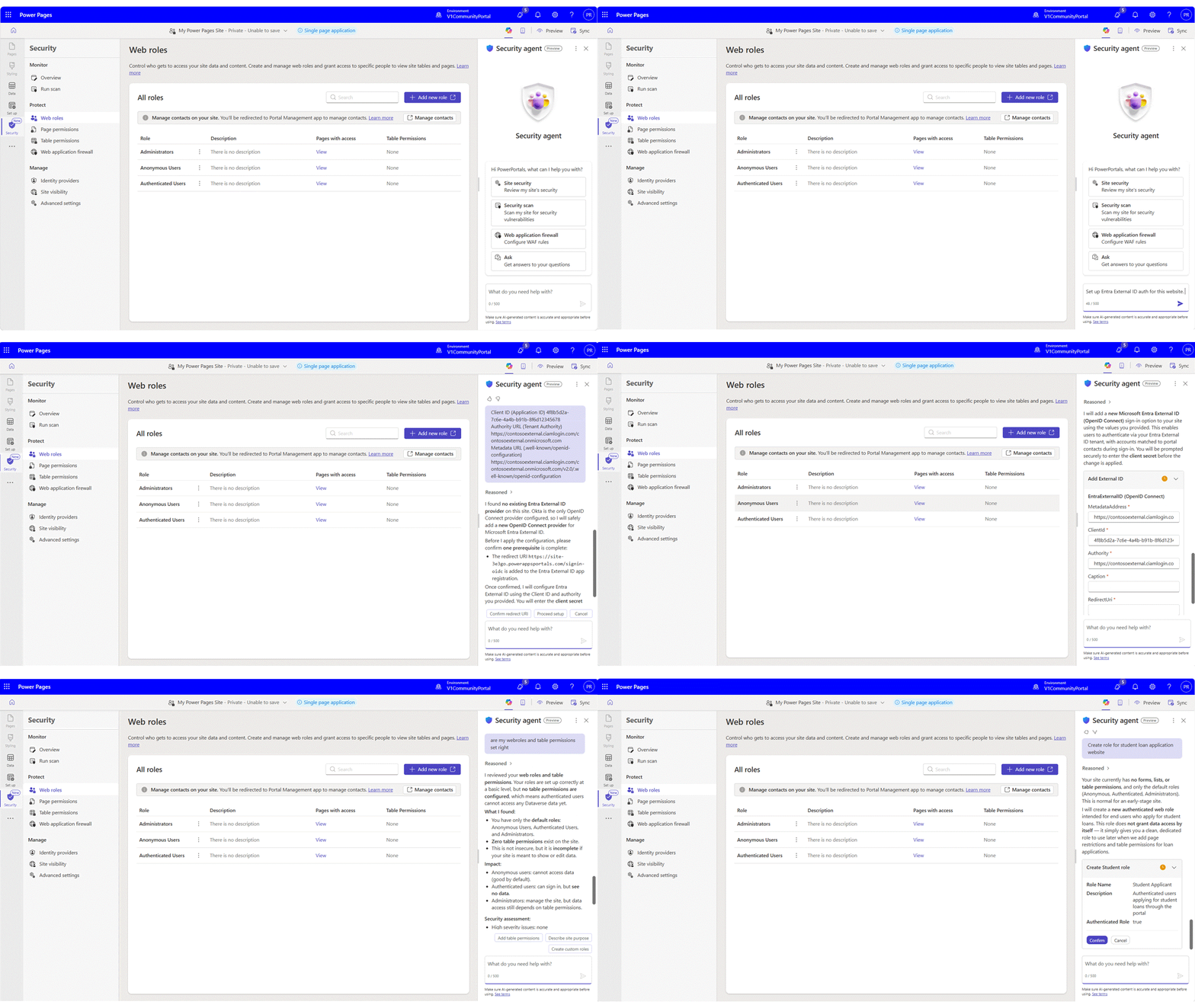
The Security Agent is available directly within the Security workspace as a conversational assistant. Simply describe what you want to accomplish, and the agent analyzes your site’s current configuration, explains its findings, recommends security improvements, and when appropriate helps apply configuration changes after your approval.
Because the agent is grounded in your site’s actual configuration, every recommendation is tailored to your site requirements rather than just generic security guidance.
Try prompts such as:
- Review my site’s security.
- Configure Microsoft Entra ID authentication for my site.
- Restrict the Sales Team role’s permissions to their own accounts only.
- Why can’t my site users sign in?
- Which tables can anonymous users access?
- Add a Content Security Policy that allows scripts.
What Security Agent can help you do
Security Agent simplifies and accelerates the most common security activities performed during Power Pages authoring.
Review your site security posture
Assess your site’s overall security using natural language conversation. The agent reviews authentication settings, authorization configuration, security settings, vulnerability scan findings, and site configuration to identify issues such as overly broad access, anonymous data exposure, missing security protections, and authentication misconfigurations.
Configure authorization
Create and manage table permissions, web roles, and page permissions through natural language instructions. The agent recommends appropriate permission scopes, validates relationships, and helps implement least-privilege access across your site.
Configure and troubleshoot authentication
Configure identity providers such as Microsoft Entra ID, Entra External ID, Azure AD B2C and OpenID Connect, SAML 2.0 based providers on your site. The agent validates authentication settings, diagnoses common sign-in issues, and recommends configuration updates to resolve authentication problems.
Configure application security
Review and configure Content Security Policy (CSP), HTTP security headers, CORS, cookie settings, and other application-level protections to help align your site with security best practices.
Why Security Agent?
Instead of navigating multiple configuration pages or searching documentation, you can use Security Agent to:
- Review their site’s security posture in a single conversation.
- Understand security insights in plain language.
- Configure authentication and authorization more efficiently.
- Apply recommended security best practices with confidence.
- Stay in control through approval-based configuration changes.
Built on real-world security patterns
Security Agent applies security patterns derived from real-world Power Pages use cases and common customer scenarios. It helps identify issues such as overly permissive access, authentication misconfigurations, invalid permission relationships, missing security settings, and other common configuration mistakes before they become production issues.
Whether you’re configuring a new site or reviewing an existing deployment, the agent helps reduce the effort required to diagnose and resolve complex security problems.
You stay in control
Security Agent never applies configuration changes automatically. Every proposed change requires your explicit approval before execution. Before making any update, the agent explains what will change and why, allowing you to review recommendations with confidence. After the action completes, the agent confirms exactly what was updated.
We recommend using Security Agent in development or test environments and promoting approved changes to production through your standard ALM process, such as Power Platform Pipelines.
Get started
Getting started is simple:
- Open your site in Power Pages Design Studio.
- Navigate to the Security workspace
- Open the Security Agent chat panel.
- Start a conversation using natural language, e.g., “Review my site’s security.”
We want your feedback
Security Agent is currently available as a Preview feature, and your feedback will help shape its future direction.
Share your feedback through the Power Pages Community Forum or submit feature ideas through the Power Pages Ideas portal.