
July 15, 2026
Share this page


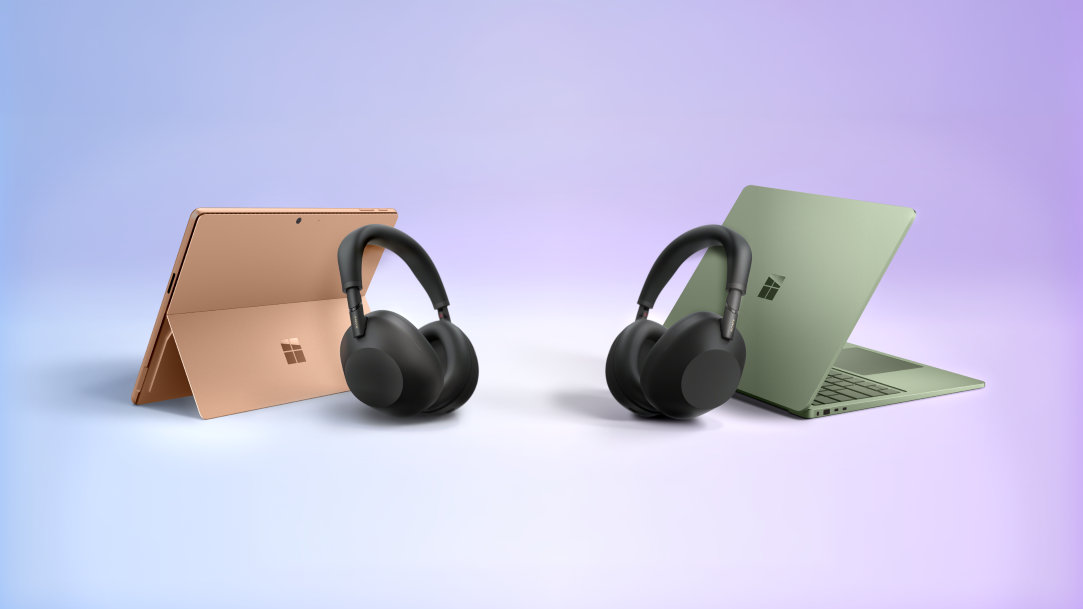
Surface + Sony WH-1000XM6: the ultimate Bluetooth LE Audio duo
In this article:
- Microsoft Surface Pro 2-in-1 PCs and Surface Laptop configured with Qualcomm Snapdragon® X2 processors and Sony WH-1000XM6 unlock the next generation of Bluetooth audio (LE Audio)
- Shared audio and other innovative Windows Bluetooth audio experiences, like super wideband stereo, are built on top of LE Audio technology.
- Details on how to set up and enable LE Audio on Surface with Sony WH-1000XM6 headphones
- Buy a qualifying Surface and receive a Sony WH-1000XM6
Surface Pro 2-in-1s and Surface Laptops configured with Qualcomm Snapdragon® X2 processors and Sony WH-1000XM6 are engineered for each other. Together they unlock the next generation of Bluetooth audio — lower latency, clearer calls, and the ability to share audio with someone right beside you.
| Super wideband stereo calls — Dramatically clearer voice quality during game chat and Spatial Audio in Teams calls on compatible Windows 11 devices | Lower latency for video & gaming — LE Audio keeps audio in sync with what's on screen | Shared audio — listen together — One Surface, two LE Audio headphones, simultaneously |
|---|
Why Bluetooth LE Audio matters on Windows 11
Surface Pro 2-in-1s and Surface Laptop configured with Snapdragon X2 processors natively support Bluetooth LE Audio — and the Sony WH-1000XM6 is purpose-built for it. Here's what that means for your everyday experience:
- Super wideband stereo for calls
LE Audio enables super wideband (SWB) stereo audio during calls on compatible Windows 11 devices — capturing a far broader frequency range than standard Bluetooth. Your voice sounds clearer, richer, and more natural on every call. SWB also provides high-quality spatial audio for many popular games, helping you better identify where sounds are coming from and communicating that info clearly with teammates. - Lower latency for video & gaming
Traditional Bluetooth can introduce audio lag that pulls sound out of sync with what's on screen. With LE Audio priority mode enabled on your WH-1000XM6 via the Sony | Sound Connect app, you get meaningfully lower latency — making video, movies, and casual gaming feel more in sync. - Shared audio — listen together
Bluetooth LE Audio with SONY WH-1000XM6 headphones enables shared audio on Surface devices, allowing a single Surface to stream the same audio to two LE Audio headphones simultaneously. Watch a movie on a plane, study side by side, or share music — no splitter, no compromise in quality. - Built into Windows 11
LE Audio and Shared Audio are native to Windows 11 — no third-party apps are required for playback. Pair your WH-1000XM6 correctly once, and access Shared Audio directly from Quick Settings. LE Audio also supports hearing aids, making this a platform-level accessibility advancement.
Compatible Surface devices
- Surface Pro: A powerful, versatile 2-in-1 PC that adapts as your day changes shape.
- Surface Laptop: A refined laptop built for sustained performance and everyday reliability.
How to pair your WH-1000XM6 with LE Audio on Surface
The key is configuring LE Audio priority in the Sony | Sound Connect app before pairing to your Surface. Follow these steps for the best experience.
Step 1 — Remove any existing Surface pairing (if applicable)
If your WH-1000XM6 was already paired to your Surface before changing your audio setting, you’ll need to remove that pairing first.
- Go to Settings › Bluetooth & devices
- Find WH-1000XM6
- Choose Remove device.
Step 2 — Set up the Sony | Sound Connect app on your phone first
Download the Sony | Sound Connect app (App Store or Google Play). Pair your WH-1000XM6 to your phone, then ensure both the headphones and app are on the latest firmware. In the app, go to headphone connection settings and select LE Audio Priority or Low Latency — this prepares the headphones for the LE Audio connection.
Step 3 — Put your WH-1000XM6 into pairing mode
With the headphones off, press and hold the Bluetooth button for approximately 5 seconds until you hear "Pairing" and the indicator flashes. On a first-time pair, the headphones may enter pairing mode automatically on power-on.
Step 4 — Use Swift Pair on your Surface
With Bluetooth on, a Swift Pair pop-up should appear when your WH-1000XM6 is nearby and in pairing mode. Select Connect.
No pop-up? Go to Settings › Bluetooth & devices › Add device › Bluetooth and select WH-1000XM6 from the list.
Get the duo. Buy Surface and get Sony WH-1000XM6 headphones.
Buy a qualifying Surface Laptop or Surface Pro and receive a Sony WH-1000XM6 — the perfect LE Audio companion — at no cost via digital redemption. Restrictions apply.
LIMITED TIME · WHILE SUPPLIES LAST
Name a more iconic duo.
We'll wait.
Purchase a new Surface Pro or Surface Laptop configured with Snapdragon X2 processors at Microsoft Store online and receive one Sony WH-1000XM6 flagship headphone via a digital redemption key, fulfilled free directly from Sony at electronics.sony.com. Headphone redemption ships within the continental United States only.
Shop Qualifying Surface Devices.
Headphone value: $459.99
Sony WH-1000XM6 · FREE
Starting July 2026 · US Microsoft Store only · Continental US shipping
What's included
Qualifying Surface device
Purchase a new Surface Pro or Surface Laptop configured with a Snapdragon X2 processor at Microsoft Store online. US only.
Sony WH-1000XM6 headphones
Receive one redemption key per qualifying purchase, delivered by email. Redeemable at electronics.sony.com. Ships within the continental US only.
$459.99 value · FREE
Instant LE Audio capability
Pair using the setup guide above to unlock super wideband calls, lower latency, and Shared Audio from day one.
Enabled on Windows 11
How to redeem
- Purchase at Microsoft Store — Buy a qualifying Surface Pro or Surface Laptop (Snapdragon X2) at Microsoft Store online.
- Receive redemption key — A Sony WH-1000XM6 digital key will be sent to your order email.
- Redeem at Sony.com — Apply your key at electronics.sony.com checkout. Headphones ship to you at no cost.
- Pair & enable LE Audio — Follow the setup guide above for the full LE Audio experience.
Offer Terms & Conditions
ELIGIBILITY
Offer valid only to customers who purchase an Eligible Surface device from the U.S. Microsoft Store during the Offer Period and who provide a shipping address located within the contiguous United States. Offer is not available in Alaska, Hawaii, Puerto Rico, Guam, the U.S. Virgin Islands, or any other U.S. territory or possession.
Limit one (1) redemption code per household. Microsoft reserves the right to determine household eligibility in its sole discretion, including by shipping address, billing address, account information, or other identifying information.
PURCHASE REQUIREMENTS
Purchase an Eligible Surface device from the U.S. Microsoft Store between July 15, 2026 and July 31, 2026 to qualify ("Offer Period"). A list of Eligible Surface devices is available here. Purchases made before or after the Offer Period (including pre-orders) are not eligible for the Offer. Purchase must be made through Microsoft Store.
REDEMPTION & SHIPMENT
A redemption code will typically be emailed within 7 business days after purchase. You must redeem your code at electronics.sony.com by December 31, 2026 ("Redemption Period"). Redemption codes are null and void after the Redemption Period and will not be honored.
Headphones will be shipped directly from Sony and must be shipped to a physical address located within the contiguous United States. Headphones cannot be shipped to Alaska, Hawaii, Puerto Rico, Guam, the U.S. Virgin Islands, other U.S. territories or possessions, PO Boxes, third-party mailbox services, or freight forwarders.
Headphones are not eligible for refund or exchange through Sony Electronics or Microsoft, except as required by applicable law. Any warranty replacement is subject to Sony's limited warranty terms and product availability.
AVAILABILITY
Offer valid while supplies last. No rain checks. Color availability may vary. Limit one (1) redemption code per household.
NON-TRANSFERABILITY & RETURNS
Offer and redemption codes are non-transferable, non-redeemable for cash or cash equivalent, and have no cash value. Offer may not be combined with other offers unless otherwise stated.
Mentioned in this article
Shop Surface
You may also like

The differences between Surface Laptop and Surface Pro from Microsoft

Why a Microsoft Surface is the best Windows device experience
